
E-Invoicing ASP
UAE e-invoicing from an accredited service provider.
Tech Ventures is accredited by the UAE to provide e-invoicing services and runs a certified Peppol Access Point. Accounting Intelligence turns your tax invoices into compliant PINT AE e-invoices and sends them — with nothing else to buy.
Every invoice becomes a PINT AE e-invoice
When you post a tax invoice or credit note, Accounting Intelligence builds the PINT AE document — seller and buyer TIN, tax categories, AED amounts, transaction flags — and validates it against the UAE rules before anything leaves.
- Invoices (380), credit notes (381) and out-of-scope documents (480, 81)
- Standard, zero-rated, exempt, out-of-scope and reverse charge
- Clear errors to fix before sending, never after
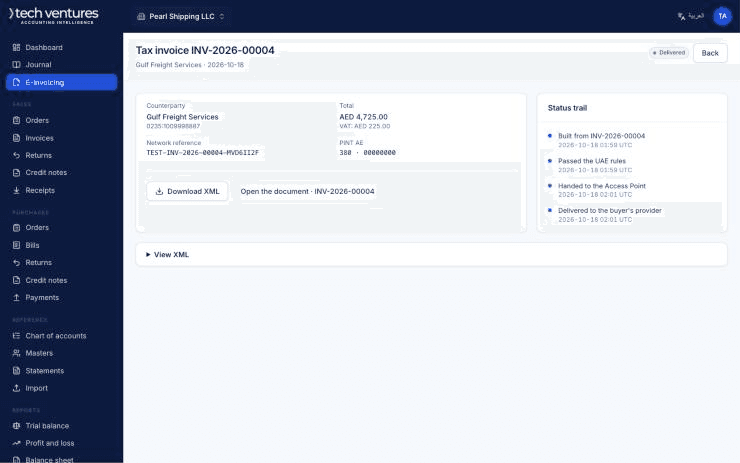
Sent through our own Access Point
Validated e-invoices go straight through our certified Peppol Access Point to your customer's provider. You see every step: validated, sent, delivered, or rejected with the reason.
- Status trail for every e-invoice
- Download the XML for your records
- Tax data reported as the five-corner model requires
Supplier e-invoices arrive as draft bills
E-invoices your suppliers send you are fetched automatically, matched to the vendor by TIN, and turned into draft purchase invoices for you to review and post.
- No re-keying of supplier invoices
- Vendor matched by tax number
- Review before anything posts
How a UAE e-invoice travels
The UAE uses a five-corner model. You issue from Accounting Intelligence, we validate the invoice and send it over Peppol to your customer's provider, and both providers report the tax data to the FTA.
E-invoicing users
Send
The seller raises the invoice in Accounting Intelligence and sends it through their accredited provider.
Receive
The buyer's software is populated with the invoice data received from their accredited provider.
Accredited service providers
Validate and transmit
Tech Ventures validates the invoice against the UAE rules and transmits it to the buyer's ASP.
Confirm ID
Checked against the Peppol directory.
Send securely
Sent over the Peppol network to the buyer's ASP.
Collect, validate and deliver
The buyer's ASP validates the invoice and delivers it into their business software.
Ministry of Finance and FTA
Collect, validate and deliver
The FTA access point validates the data and passes it securely to the Central Data Platform.
Collect, process and store
Tax data reported from Corner 2 and Corner 3 is processed and stored by the FTA.