
Help centre
Reports, and closing a period
Trial balance, profit and loss, balance sheet, ageing — and how to close a month so it stays closed.
4 min read5 steps
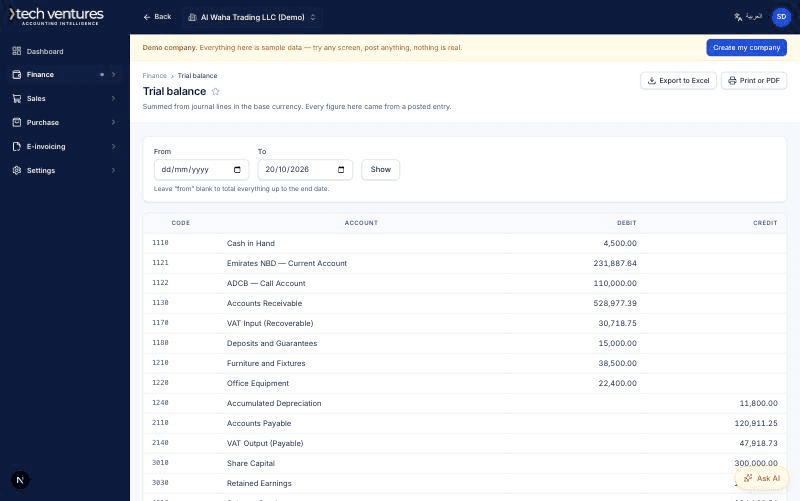
Every report in the system reads journal lines for a date range and a company. There is no separate reporting store to fall out of step, which is why the trial balance always balances and why a report can always be drilled to the entries behind it.
Step by step
- 1
Start at the trial balance
If anything is wrong, it is visible here first. Debits equal credits in base currency, always — that is enforced at posting, not checked afterwards.
- 2
Read the P&L and the balance sheet
Both take a date range and a comparison period. Any figure opens into its account, and any account opens into its entries.
- 3
Check the ageing reports
Receivables and payables by age bucket, built from allocations. A customer appears overdue only if an unallocated amount is genuinely past its due date.
- 4
Close the month
Settings, then Periods. Closing locks the period against any posting at all. Reopen it only deliberately, and expect to re-check every report that touched it.
- 5
Close the year
The year-end routine posts the profit to retained earnings and opens the next year's balances. Run it after the last adjustment, not before.
Questions about this
Can I get a report in Arabic?
Yes. Switch the language and every screen, report and document follows, right to left.
Why can two companies' reports not be combined?
Because nothing crosses a company boundary by design — the query layer makes a cross-company read impossible rather than merely discouraged. Consolidation is a separate, deliberate report.