
Help centre
Send your first UAE e-invoice
Register the company on the network, send an invoice through the Access Point, and read what comes back.
6 min read5 steps
UAE e-invoicing moves the document from you to your customer through two accredited service providers and reports it to the Federal Tax Authority. You do not email a PDF; you send a structured PINT AE document, and the network either accepts it or tells you exactly which rule it broke.
Step by step
- 1
Check the company is in scope and registered
Settings, then E-invoicing. Enter the TRN and the Peppol identifier. The system registers the company on the network through our accredited Access Point; until that is confirmed, invoices post to the ledger but do not transmit.
- 2
Make sure the customer can receive
A customer needs a TRN and a Peppol identifier of their own. The system looks them up on the network; if they are not reachable, the invoice is still a valid tax invoice and is sent the old way, and the e-invoicing tab says so.
- 3
Post the invoice
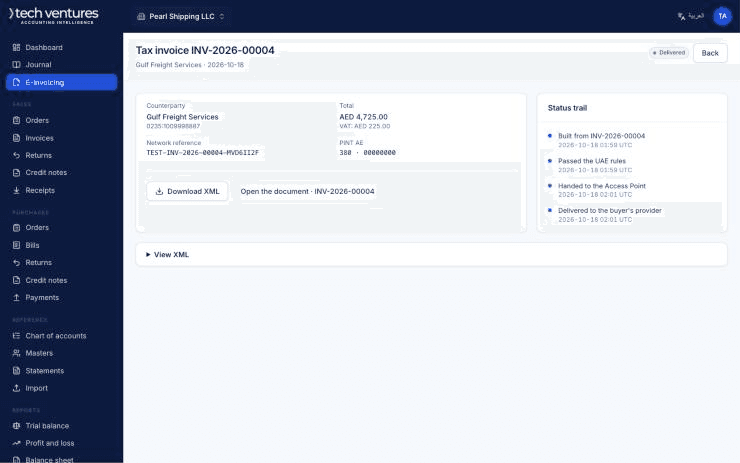
Transmission happens on posting, in the background. The document shows Queued, then Sent, then the verdicts as they arrive.
- 4
Read the statuses properly
There are two separate verdicts: your customer's Access Point, and the tax authority. Each is blank until it arrives, and blank means not yet known — not accepted. Only treat an invoice as delivered when the status says so.
- 5
Fix a rejection and send again
A rejection names the rule and the field. Reverse the invoice, correct the master data that caused it — almost always a missing TRN, a wrong tax category or an address without an emirate — and raise it again.
Questions about this
What counts against my document allowance?
A document successfully sent or received. Drafts, documents that fail validation and documents rejected before transmission use none.
Do incoming supplier invoices count?
Yes. A purchase document received over the network counts as one document, the same as one you send.
Can I send e-invoices during the trial?
Yes, real ones, out of the trial's included allowance.