
Help centre
Purchases, expenses and paying suppliers
Record what you buy, reclaim the VAT on it, and settle it against the right invoices.
5 min read5 steps
The purchase side mirrors the sales side: a purchase invoice posts a credit to the supplier and debits an expense — or inventory, if the item is tracked — and the input VAT lands in the account the VAT 201 reads.
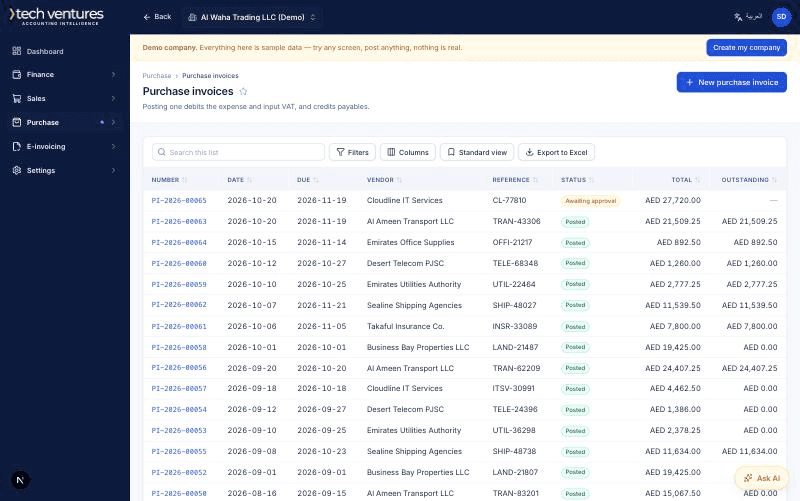
Step by step
- 1
Enter the supplier invoice
Purchases, then Invoices, then New. Their invoice number goes in the reference field: it is what you will search for when they chase payment, and what the VAT return is evidenced by.
- 2
Use the right tax code
Standard-rated for most local purchases, reverse charge for imported services, out of scope for things that never carried VAT. The code decides whether the input tax is reclaimable, so guessing here is a VAT 201 problem later.
- 3
Attach the document
The supplier's PDF stays with the entry. An auditor asking for evidence of a reclaim gets it in one click instead of a search through email.
- 4
Pay, and match
A payment is allocated against specific invoices, not against a balance. Part-pay one, settle three at once, or leave an amount on account — the ageing report follows the allocation, so what is overdue is always what is actually overdue.
- 5
Reconcile the bank
Import the statement, match what the system already knows about, and post the rest. Anything left unmatched is either a missing document or a bank charge nobody recorded.
Questions about this
What is reverse charge, in one sentence?
For imported services you account for the VAT yourself — output and input in the same return — so the net effect is nil but both figures must appear, and the tax code does that for you.
Can I pay in a different currency from the invoice?
Yes. The difference between the rate on the invoice and the rate on the payment is posted automatically as an exchange gain or loss.