
Help centre
File the VAT 201
Produce the return from the ledger, check it against the boxes, and know what to do when it disagrees.
5 min read5 steps
The VAT return is built from journal lines, not from a list of invoices. That is the whole point: every figure in it can be clicked through to the entries behind it, and a figure that looks wrong is a question about the ledger rather than about the report.
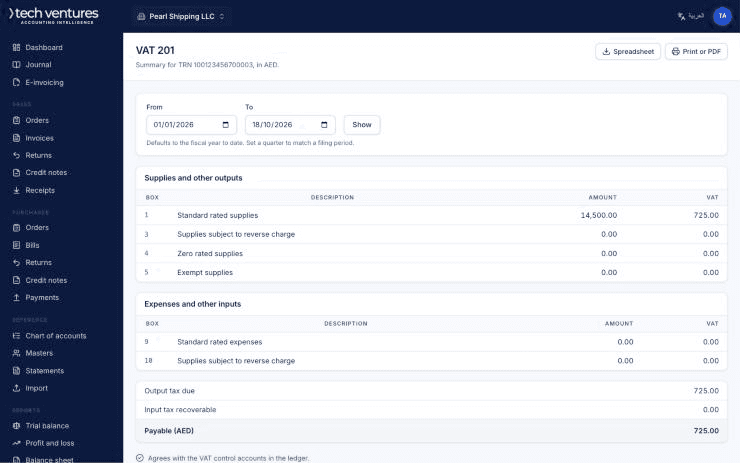
Step by step
- 1
Choose the period
Reports, then VAT 201. Pick the tax period — monthly or quarterly, whichever the FTA gave the company.
- 2
Work down the boxes
Standard-rated supplies by emirate, zero-rated, exempt, reverse charge, then the recoverable input tax. Each box opens into the entries that make it up.
- 3
Check the two things that usually disagree
A reversal posted into the next period moves tax between returns, and a credit note dated after the period end belongs to the next one. Both are correct; both surprise people.
- 4
Export and file
Export the return, file it on the FTA portal, and post the payment or the refund against the VAT control account so the balance sheet carries nothing stale.
- 5
Close the period
Once filed, close it. Nothing posts into a closed period, which is the only reliable way to stop a late entry quietly changing a return you have already submitted.
Questions about this
The return does not match my invoice list.
It is not supposed to. The return reads the ledger; an invoice list reads documents. A reversed invoice, for example, is gone from the ledger and still in the list.
I found an error in a filed return.
Post the correction in the current period and disclose it to the FTA under their voluntary disclosure rules. Do not reopen a closed period.