
Chart of accounts
Review the UAE chart your company starts with, add accounts and headings, and understand which accounts the system posts to by itself.
The chart of accounts is the list of every account the business posts to. Each account has a type — asset, liability, equity, income or expense — that decides where it appears in the balance sheet and the profit and loss. Accounts sit under headings, which group them in reports and cannot be posted to themselves.
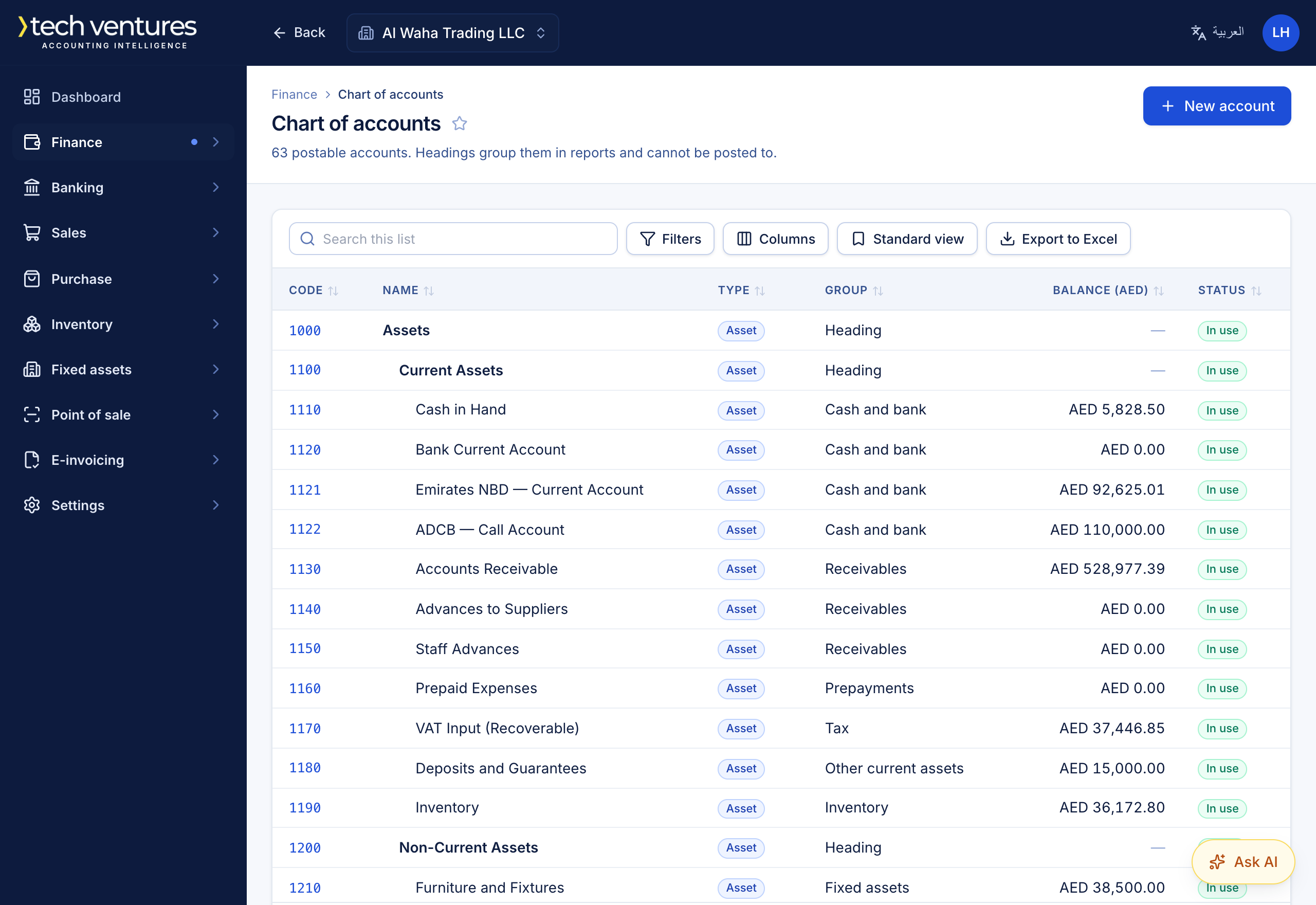
The chart you start with
A new company starts with a UAE chart of accounts, numbered in blocks:
| Codes | Heading | Examples |
|---|---|---|
| 1000 | Assets | Cash in Hand, Bank Current Account, Accounts Receivable, VAT Input (Recoverable), Inventory, Furniture and Fixtures |
| 2000 | Liabilities | Accounts Payable, Advances from Customers, VAT Output (Payable), Salaries Payable, Bank Loans |
| 3000 | Equity | Share Capital, Partner Current Account, Retained Earnings, Statutory Reserve |
| 4000 | Income | Sales — Goods, Sales — Services, Other Income, Foreign Exchange Gain |
| 5000 | Cost of Sales | Purchases, Freight and Clearing, Cost of Goods Sold, Stock Adjustments |
| 6000 | Operating Expenses | Salaries and Wages, Rent, Utilities, Bank Charges, Depreciation |
Chart of accounts shows them as a tree, indented under their headings, with each account's Balance, Dr + / Cr − to date. Debits show positive and credits negative, so the whole column adds up to zero — which is what a set of books that balances looks like. Choose a balance to open the general ledger for that account.
Before you start
- You need the Admin or Owner role to add or change accounts. Everyone can view the chart.
- Decide on a code range for each new account. Codes are letters, digits, dots and hyphens, up to 12 characters.
Add an account
- Go to Finance › Chart of accounts and choose New account.
- Leave Code blank to number it after the last account under its heading, or type your own.
- Enter the Name, for example Emirates NBD Current Account.
- Choose the Type.
- Choose the heading it sits Under heading. The heading must be the same type.
- Enter a Report group if you want one, such as Cash and bank or Cost of sales. See the note below — two report groups change how reports read the account.
- Tick Heading only if this is a grouping line rather than an account you post to.
- Choose Create.
Important
The Report group is not just a label. An expense account in the group Cost of sales is shown under cost of sales and counts towards gross profit in the profit and loss; every other expense is an operating expense. An asset account in the group Cash and bank is treated as cash: it appears in the cash flow report and the bank and cash ledger, and it is not allowed to go below zero unless it is a bank account whose record allows an overdraft.
Fields
| Field | What to enter |
|---|---|
| Code | The account number. Leave blank to number it automatically. Must be unique. |
| Name | What the account is called on reports and in pickers. |
| Type | Asset, Liability, Equity, Income or Expense. |
| Under heading | The heading it is grouped under. Must be the same type. |
| Report group | Shown in reports, e.g. Cash and bank, Cost of sales. |
| Heading | Ticked for a grouping line. Headings carry no balance of their own and cannot be posted to. |
| Active | Untick to stop using the account. Posting to an inactive account is refused. |
Accounts used by the system
Some accounts are posted to automatically: Accounts Receivable, Accounts Payable, VAT Input, VAT Output, Retained Earnings, Foreign Exchange Gain and Loss, Inventory, Cost of Goods Sold, Depreciation and a few others. Show the hidden used by the system column on the list to see which.
You can rename one of these and move it under another heading, but not change its type, switch it off, or turn it into a heading — the app finds it by what it does, and posting would fail without it.
Change an account
Open the account from the list by its code. You can change the name, code, heading and report group at any time. Two changes are limited once entries exist:
- Type cannot change on an account that has entries posted to it. That would move its history from one side of the balance sheet to the other.
- An account with entries cannot become a heading.
There is no delete for accounts. Untick Active on one you no longer use.
Import accounts
To load a long chart from a spreadsheet, use the import on the list. See Import customers, vendors, items and balances.
What it posts
Nothing. Adding or changing an account posts no entry. Balances come only from documents and journal vouchers posted to the account.
Related articles
- How posting worksWhy every figure in the app comes from a balanced journal entry, why posted entries cannot be edited, and what is checked before anything reaches the ledger.
- Post a journal voucherPost an entry straight to the general ledger for accruals, reclassifications and corrections that no invoice, receipt or payment covers.
- Import customers, vendors, items and balancesBring customers, vendors, items, accounts, cost centres, projects, locations and draft documents across from CSV files, and opening balances from Excel.
- Trial balanceEvery account with a balance on one page, as a net debit or credit, with the proof that the books add up and a link from each figure to its ledger.