
Profit and loss
Income, cost of sales, gross profit, operating expenses and net profit for any period, for the whole business or one cost centre or project.
The profit and loss shows what the business earned in a period and what it cost to earn it. Every figure comes from posted journal lines, and each one opens the ledger behind it.
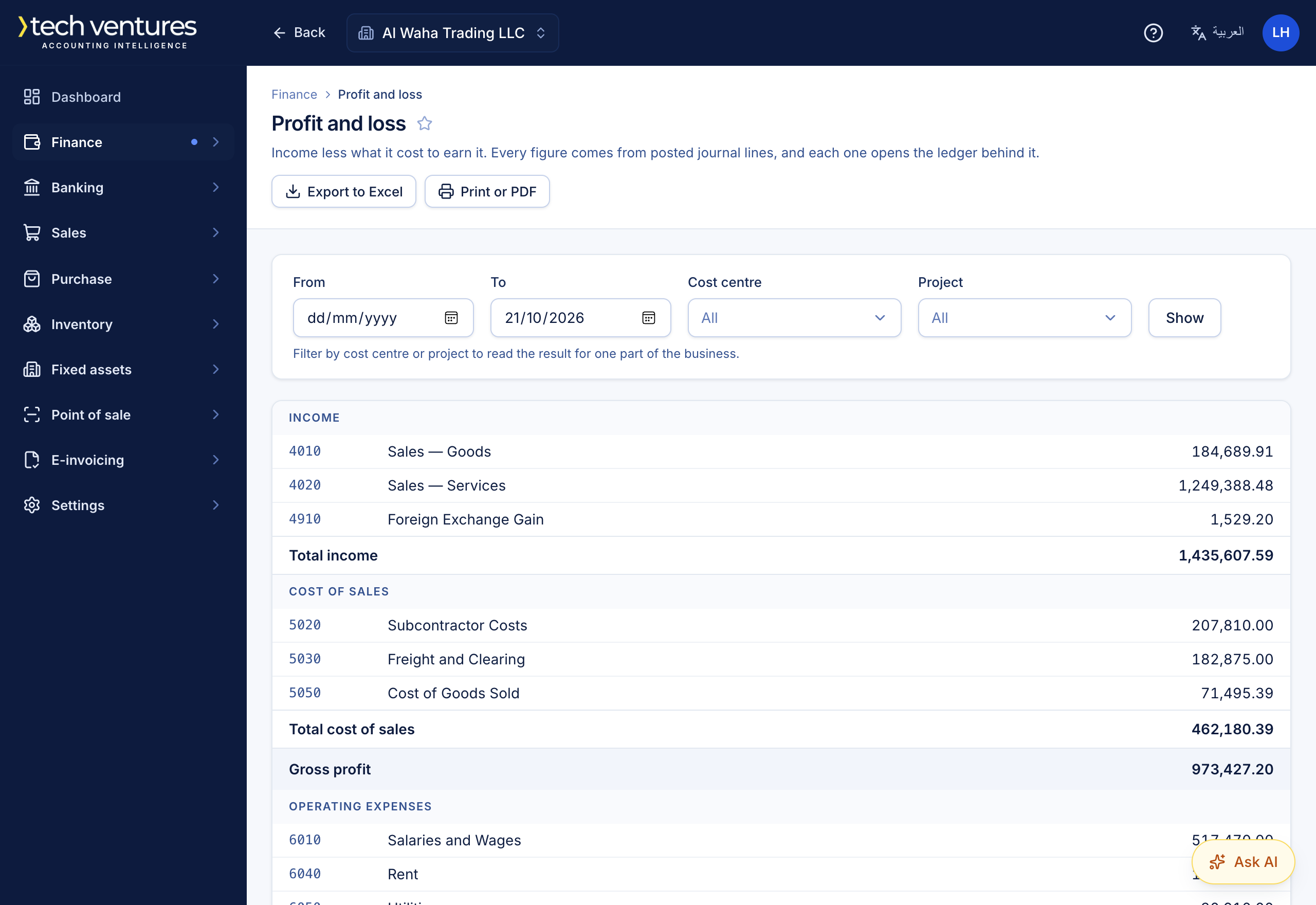
Run it
- Go to Finance › Profit and loss.
- Set From and To. Leave From blank to include everything up to To.
- To read one part of the business, choose a Cost centre or Project. Each list also offers No cost centre or No project, for the lines posted without one.
- Choose Show.
Read it
| Section | What is in it |
|---|---|
| Income | Every income account with a balance in the period. Total income. |
| Cost of sales | Expense accounts in the report group Cost of sales. Total cost of sales. |
| Gross profit | Income less cost of sales. |
| Operating expenses | Every other expense account. Total expenses. |
| Net profit, or Net loss | Gross profit less expenses, in your base currency. |
Amounts are shown the way each account is normally read: income as a positive credit, expenses as a positive debit.
Choose any account's amount to open the general ledger for that account, over the same dates and with the same cost centre or project. Choose a total, the gross profit or the net profit to open the ledger for every account in it.
Tip
Whether an expense counts as cost of sales depends only on its Report group in the chart of accounts. If gross profit looks wrong, check that your direct-cost accounts are in Cost of sales.
Things to know
- The year-end closing entry is left out, so a profit and loss for a closed year still shows its real income and expenses.
- Only posted entries count. A draft invoice is not income.
- A person limited to certain cost centres or projects sees only their share.
Export and print
Choose Export to Excel for a spreadsheet with the same filters, or Print or PDF.
Related reports
- Monthly results — the same statement, month by month.
- Profit by dimension — profit for every value of a dimension side by side.
- Expense analysis — where the money went.
Related articles
- Balance sheetWhat the company owns and owes as at a date — assets, liabilities and equity, including the profit not yet closed to retained earnings.
- Monthly resultsThe profit and loss month by month across the fiscal year, account by account, with a chart of income against expenses.
- Profit by dimensionIncome, expense and profit for every value of a cost centre, project or your own dimension, side by side, read from the ledger.
- Chart of accountsReview the UAE chart your company starts with, add accounts and headings, and understand which accounts the system posts to by itself.