
Dashboards
Your home Dashboard and its Role Center, the counts of what is waiting, quick actions, favourite reports, and the dashboard each module opens with.
/appDashboards put the figures you watch most on one page, read live from the ledger. There are two kinds: the Dashboard you land on when you sign in, laid out for the work you do, and a dashboard at the top of each module's menu.
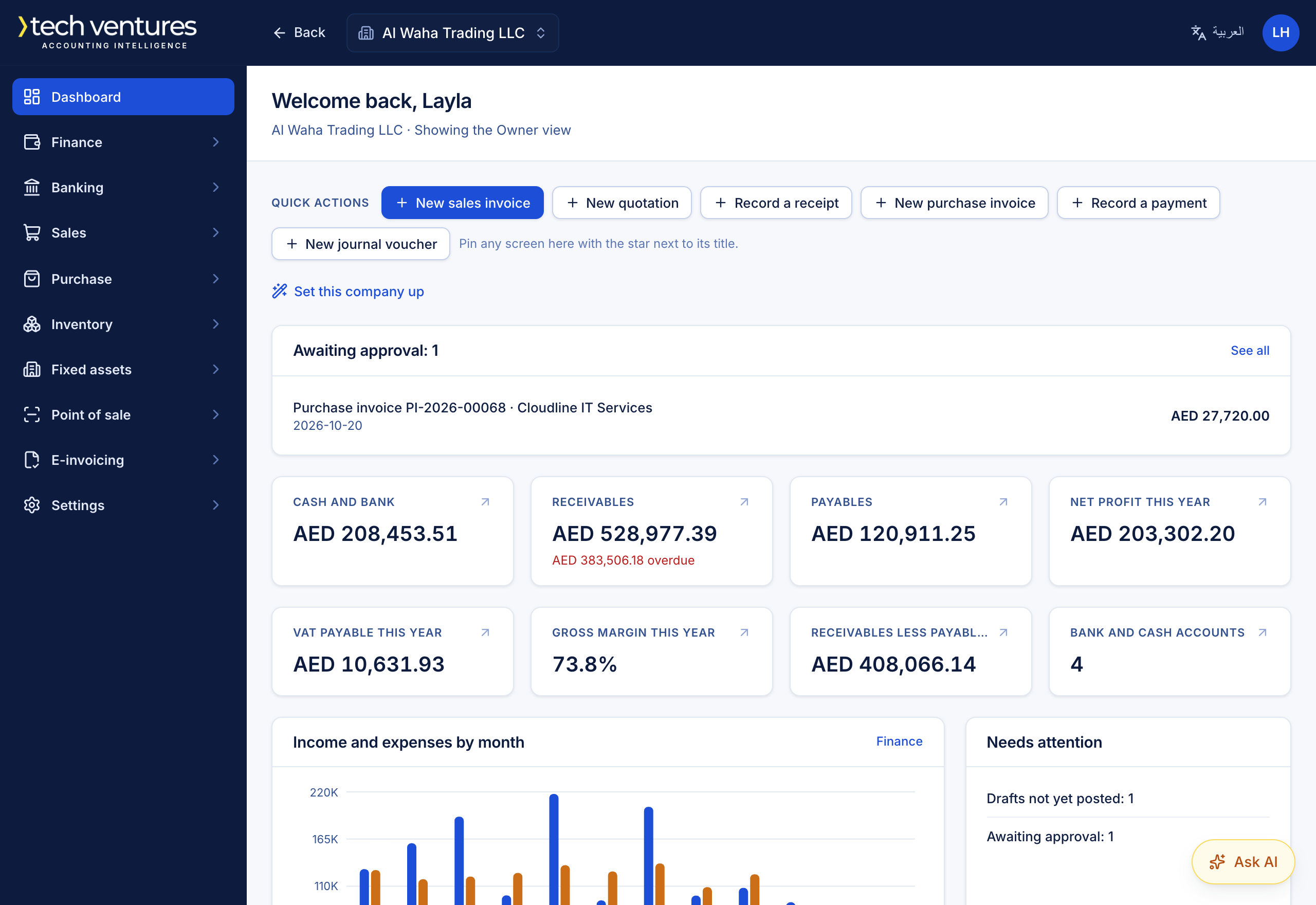
Your Dashboard and its Role Center
Dashboard, at the top of the menu on the left, is your home page in the company. What it puts first is decided by your Role Center, named under the greeting — for example Accountant Role Center.
| Role Center | Puts first |
|---|---|
| Business Manager | Cash, results, sales and purchases at a glance, and whatever is waiting on somebody. |
| Accountant | Cash, VAT, margins and bank balances, the approval queue, and the latest journal entries. |
| Sales Order Processor | Sales this month and year, open quotations, invoices falling due and your best customers. |
| Purchasing Agent | Purchases this month and year, open orders, bills falling due and your main vendors. |
| Inventory Manager | What is held and what it is worth, what moved lately, and stock that has gone below zero. |
| Approver | The approval queue first, then what needs attention across the books. |
| Treasurer | What the banks hold, how it moved through the year, the cheques still to clear, and what falls due. |
| Production Manager | What was made and what it cost this month, the year's trend, and the stock behind it. |
| Asset Manager | What the company owns, what has been written off it, and the year's depreciation charge. |
| Project Manager | What each job has earned and cost, the year's trend, and projects over budget or losing money. |
| Property Manager | Occupancy, the rent that is due or overdue, and the leases coming to an end. |
| Store Manager | Today's takings, the last fortnight's sales, what sells best, open shifts and the stock on the shelves. |
| Service Manager | New requests, work orders open and overdue, contracts to invoice, and the trend of work completed. |
A Role Center decides what comes first, not what you may see or do — your role decides that. Parts that read a module you cannot use are left out.
To change it, choose Change on the Dashboard, or go to your profile, and choose Use this one on another Role Center. Until you choose, you get your role's default. See Your profile, language and password.
What is on the Dashboard
- Quick actions — buttons for what you do most: New sales invoice, Record a receipt, New journal voucher and so on, depending on your modules and role. Pin any other screen here with the star next to its title.
- Activities — counts of things waiting, such as documents awaiting approval, drafts not yet posted, overdue invoices or bills due. Each opens the list that holds them.
- Needs attention, in most Role Centers — unposted drafts, documents awaiting approval and e-invoices with problems.
- The parts of your Role Center: key figures, charts and lists.
- Your modules — a card for each module's own dashboard.
Owners and admins also see the set-up list until the company is fully configured.
Favourite reports
Reports you star in the report catalogue are listed under Dashboard in the menu on the left, so each is one click away.
Module dashboards
Each module's menu starts with Overview › Dashboard. The Finance dashboard, under Finance › Dashboard, shows:
| Part | What it shows | Opens |
|---|---|---|
| Cash and bank | The total in every bank and cash account. | Bank and cash ledger |
| Receivables | What customers owe, and how much is overdue. | Customer ledger |
| Payables | What you owe vendors. | Vendor ledger |
| Net profit this year | Profit for the fiscal year to date, with the gross margin. | Profit and loss |
| Income and expenses by month | A column chart across the fiscal year. | Monthly results |
| VAT payable this year | Output less input VAT for the year to date. | VAT 201 |
| Bank and cash accounts | Each account's balance. | That account's ledger |
| Cash and bank at month end | The trend of your cash position. | Cash flow |
| Where the money goes | The mix of expenses. | Expense analysis |
| Revenue and profit by month | This year's revenue and profit, against last year's revenue. | Profit and loss |
| Receivables by age, Payables by age | What is owed, by how late it is. | Receivables or payables ageing |
| Recent journal entries | The latest entries posted. | The journal |
New journal voucher at the top opens a journal voucher.
Every figure is read from posted entries, so it is current the moment something posts. A person limited to certain cost centres or projects sees only their share.
Related articles
- Find and run a reportFind any of several hundred ready-made reports by searching or browsing by module, run it over a date range, export it, and star the ones you use.
- Find your way aroundThe menu, the top bar, menu search, the dashboard and its quick actions, lists and their views, and the screens that gather drafts and approvals in one place.
- Your profile, language and passwordSet your name, photo and contact details, choose the Role Center your dashboard opens with, switch between English and Arabic, and change your password.
- Profit and lossIncome, cost of sales, gross profit, operating expenses and net profit for any period, for the whole business or one cost centre or project.