
Run depreciation
Preview and post a month's depreciation across every asset in use as one journal entry, and reverse it correctly if it was wrong.
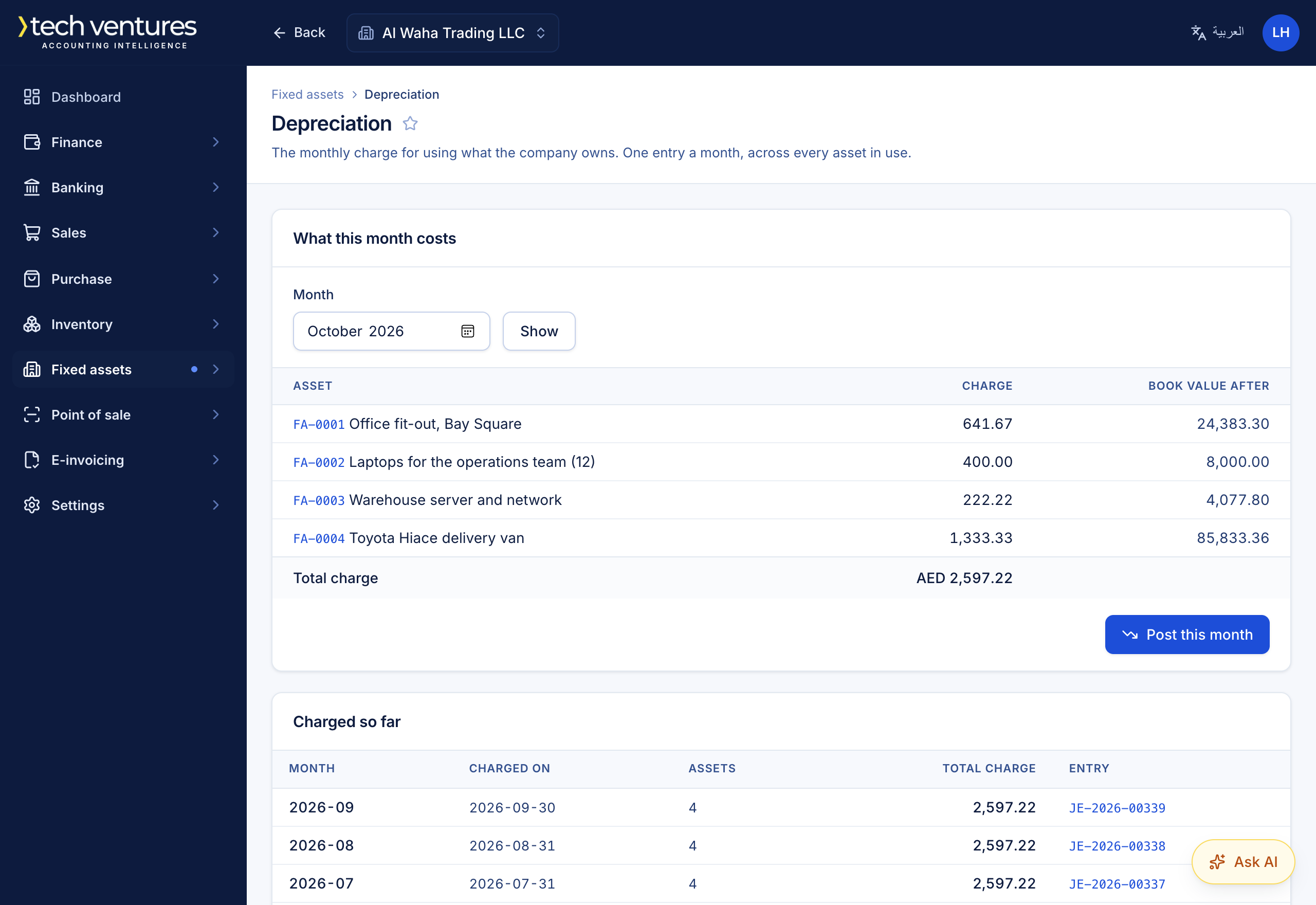
Depreciation is the monthly charge for using what the company owns. Under Fixed assets › Depreciation you choose a month, see exactly what it will cost asset by asset, and post it as one journal entry across every asset in use. There is no document to check a depreciation entry against — only arithmetic over the register — which is why the preview shows the same calculation that will be posted.
Charging depreciation is part of the month-end close.
Before you start
- Your assets are on the register with the right First used dates, costs and lives.
- The month's period is open.
- You hold the Accountant role or higher to post. Others can see the preview and the history.
Post a month
- Go to Fixed assets › Depreciation. The Month starts on the month after the last one charged, or the current month if nothing has been charged yet.
- To look at another month, change Month and choose Show.
- Read What this month costs: each asset, its Charge and its Book value after, with the Total charge at the foot.
- Choose Post this month and confirm. One journal entry is posted, dated the last day of the month.
The month then appears under Charged so far, with the date it was charged, how many assets it covered, the total and a link to the entry.
Important
A month is charged once. Charging it twice would halve a profit you may already have reported, so a month already charged shows Already charged and cannot be posted again. Each month is also its own charge: a month you skip is not caught up by the next one, so post every month, in order.
Which assets are charged
An asset is charged in a month when:
- its First used month is that month or earlier — a whole month is charged, however late in the month it came into use;
- it has not been disposed of; and
- it is still above its residual value.
If nothing qualifies, the preview says Nothing to charge this month. Check the dates on the register.
When a charge brings an asset down to its residual value, its status changes to Fully depreciated and it is left out of later months.
How each charge is worked out
- Straight line: (cost − residual value) ÷ useful life in months, rounded to the fil.
- Reducing balance: the yearly rate ÷ 12 × (cost − everything written off so far), rounded to the fil.
- In both, the charge never takes the asset below its residual value, and the last month of the useful life takes whatever is left, so the charges add up exactly to cost less residual value.
- What an asset was Already written down by when it was registered counts as written off.
What it posts
One entry for the month. The expense is split by account, cost centre and project; the credit is split by accumulated depreciation account. For a van charged AED 1,800.00 and laptops charged AED 250.00, in categories that share the default accounts:
| Account | Debit | Credit |
|---|---|---|
| Depreciation | 2,050.00 | |
| Accumulated Depreciation | 2,050.00 |
The narration reads "Depreciation for" and the month, such as 2026-03. Each asset on a cost centre or project puts its share of the expense on a line carrying that cost centre or project.
Correct or cancel it
A posted month is undone by reversing its journal entry: open the entry from Charged so far and use Reverse. See Reverse a journal entry. The month comes off the register with it, any asset the month had made Fully depreciated is back In use, and the month can be charged again.
Two rules keep the figures straight:
- Only the latest month can be reversed. Each month is worked out on the book value the month before left. Reverse later months first, newest first.
- A month that charged an asset since disposed of cannot be reversed until the disposal is reversed.
Related reports
- Fixed asset reports — depreciation by month, category, cost centre and asset.
- Profit and loss — the expense.
- Balance sheet — cost less accumulated depreciation.
Related articles
- Add an asset to the registerRecord an asset on the register with its cost, life and depreciation method, then bring its cost into the books through a purchase invoice or opening balances.
- Month-end closeA checklist for finishing a month — post what is outstanding, release deferrals, run depreciation, reconcile banks and VAT, review the trial balance, then close the period.
- Reverse a journal entryUndo a posted entry the only way the ledger allows — by posting its mirror image — and know when a reversal is refused.
- Fixed asset reportsSee what the company owns, what has been written off it, what is left and what was sold, from the register, the dashboard and the asset reports.