
VAT 201 return
The figures for the FTA's VAT 201 return, box by box, read from posted documents and checked against the VAT accounts in the ledger.
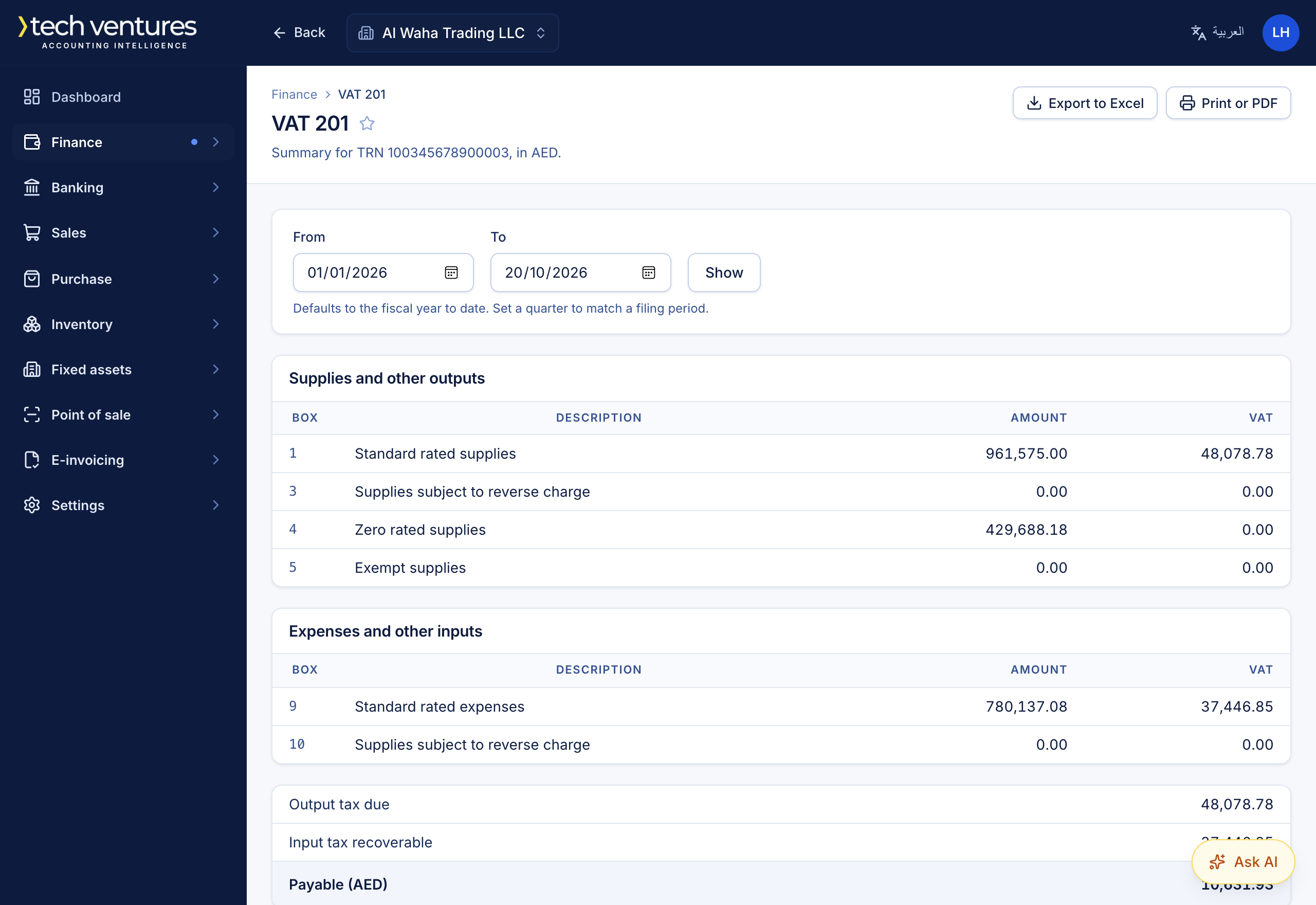
VAT 201 gives you the figures to enter on the Federal Tax Authority's VAT 201 return for a period. Open it from VAT › Returns and reconciliation › VAT 201. The heading shows your TRN and the currency.
The return is built from the lines of posted documents and their tax codes, because the form asks for net amounts and VAT split by treatment, which a journal line does not carry. It is then checked against the VAT output and VAT input accounts in the ledger, so you know the two agree before you file.
Before you start
- Every document for the period is posted. Drafts are not on the return.
- Your company's Emirate is set under Settings › Company.
- The tax codes on your lines have the right treatment.
Show a period
- Set From and To to the return period, usually a quarter. Without a From date the page shows the fiscal year to date.
- Choose Show.
- Choose any amount to see Documents in this box: every document behind it, with its date, customer or vendor, amount and VAT. Each opens the document.
Export to Excel downloads the figures on screen; Print or PDF prints them.
What goes in each box
Only posted sales invoices, sales credit notes, purchase invoices, purchase credit notes and fixed asset sales are read. A credit note reduces the box it falls in. A foreign-currency document is converted to your base currency at its own exchange rate. Lines with an Out of scope code are left off.
Each line goes in the box its tax code's Treatment gives it, unless the code's VAT 201 box says 2, 6 or 7 (see Tax codes): 2 on a sales code, and 6 or 7 on a reverse-charge purchase code, put the line in that box instead.
Supplies and other outputs
| Box | Description | Where the figure comes from |
|---|---|---|
| 1a–1g | Standard rated supplies in Abu Dhabi, Dubai, Sharjah, Ajman, Umm Al Quwain, Ras Al Khaimah, Fujairah | Sales lines with a Standard rated code, and fixed assets sold with one. All of them go in the box of the emirate set on your company; the others show zero. |
| 1 | Standard rated supplies | Shown instead of 1a–1g when the company has no emirate set. Set it to split by emirate. |
| 2 | Tax refunds provided to tourists | Sales lines whose tax code has VAT 201 box 2. |
| 3 | Supplies subject to reverse charge | Purchase lines with a Reverse charge code: the net amount and the VAT you account for on them. See Reverse charge. A code whose VAT 201 box is 6 or 7 goes there instead. |
| 4 | Zero rated supplies | Sales lines with a Zero rated code, and zero-rated asset sales. |
| 5 | Exempt supplies | Sales lines with an Exempt code, and exempt asset sales. |
| 6 | Goods imported into the UAE | Purchase lines with a Reverse charge code whose VAT 201 box is 6: the net amount and the VAT you account for on them. |
| 7 | Adjustments to goods imported into the UAE | Purchase lines with a Reverse charge code whose VAT 201 box is 7. |
| 8 | Totals | The total of the output boxes above. |
Expenses and other inputs
| Box | Description | Where the figure comes from |
|---|---|---|
| 9 | Standard rated expenses | Purchase lines with any code other than Reverse charge or Out of scope, and the input VAT on them. |
| 10 | Supplies subject to reverse charge | Every reverse-charge purchase, whether declared in box 3, 6 or 7, with its VAT as recoverable input tax. |
| 11 | Totals | The total of boxes 9 and 10. |
A sale under the reverse charge is in no box: the buyer declares it.
The totals
| Line | How it is worked out |
|---|---|
| Output tax due | The VAT in box 8: standard-rated supplies, tourist refunds, and the reverse charge declared in boxes 3, 6 and 7. |
| Input tax recoverable | The VAT in box 11: boxes 9 and 10. |
| Payable (AED) or Refundable (AED) | Output tax due less input tax recoverable. |
Each total opens the ledger of the VAT accounts behind it.
For example, a quarter with AED 100,000.00 of standard-rated sales and AED 40,000.00 of standard-rated purchases, at 5%, shows AED 5,000.00 output tax due, AED 2,000.00 input tax recoverable, and AED 3,000.00 payable.
The check against the ledger
Under the totals the page says either Agrees with the VAT control accounts in the ledger. or This does not agree with the ledger., with how much output and input tax differ.
The usual cause of a difference is a journal voucher posted straight to a VAT account, which has no document line behind it to appear in a box. Choose Check the ledger for those accounts before filing. to find it, and do not file until you know which figure is right.
After you file
The app gives you the figures; you file the return on the FTA's own portal. See File a VAT return for the whole process, and close the period afterwards so nothing more can post into it.
Related articles
- File a VAT returnThe steps from posting a quarter's documents to having VAT 201 figures you can file with confidence, checked against the ledger and the e-invoices.
- VAT reconciliationCompare output and input VAT as the ledger, the VAT return and the e-invoices each report it, and find the documents that explain any gap.
- Tax codesThe VAT codes every document line carries, what each treatment does to posting, the VAT return and the e-invoice, and how to add one.
- Reverse chargeHow a reverse-charge purchase posts both output and input VAT, why a reverse-charge sale posts none, and where each appears on the VAT 201 return.
- Month-end closeA checklist for finishing a month — post what is outstanding, release deferrals, run depreciation, reconcile banks and VAT, review the trial balance, then close the period.