
The POS dashboard and the Z-report
Read a shift's Z-report — sales, VAT, takings by account, the drawer count — and follow the counter's trading on the dashboard and in the till reports.
/app/pos/dashboardEvery figure the point of sale screens show is read from the posted documents — the invoices, receipts and credit notes the tills rang up — not from running totals kept on the shift. A shift looked at twice tells the same story both times, and a reversed sale drops out without anyone adjusting anything.
The Z-report
Each shift has a Z-report: open it from the till with Z-report, or from Point of sale › Till sessions. The header names the shop and when the shift opened. While the shift is open it is a running report; once closed, it is the shift's record.
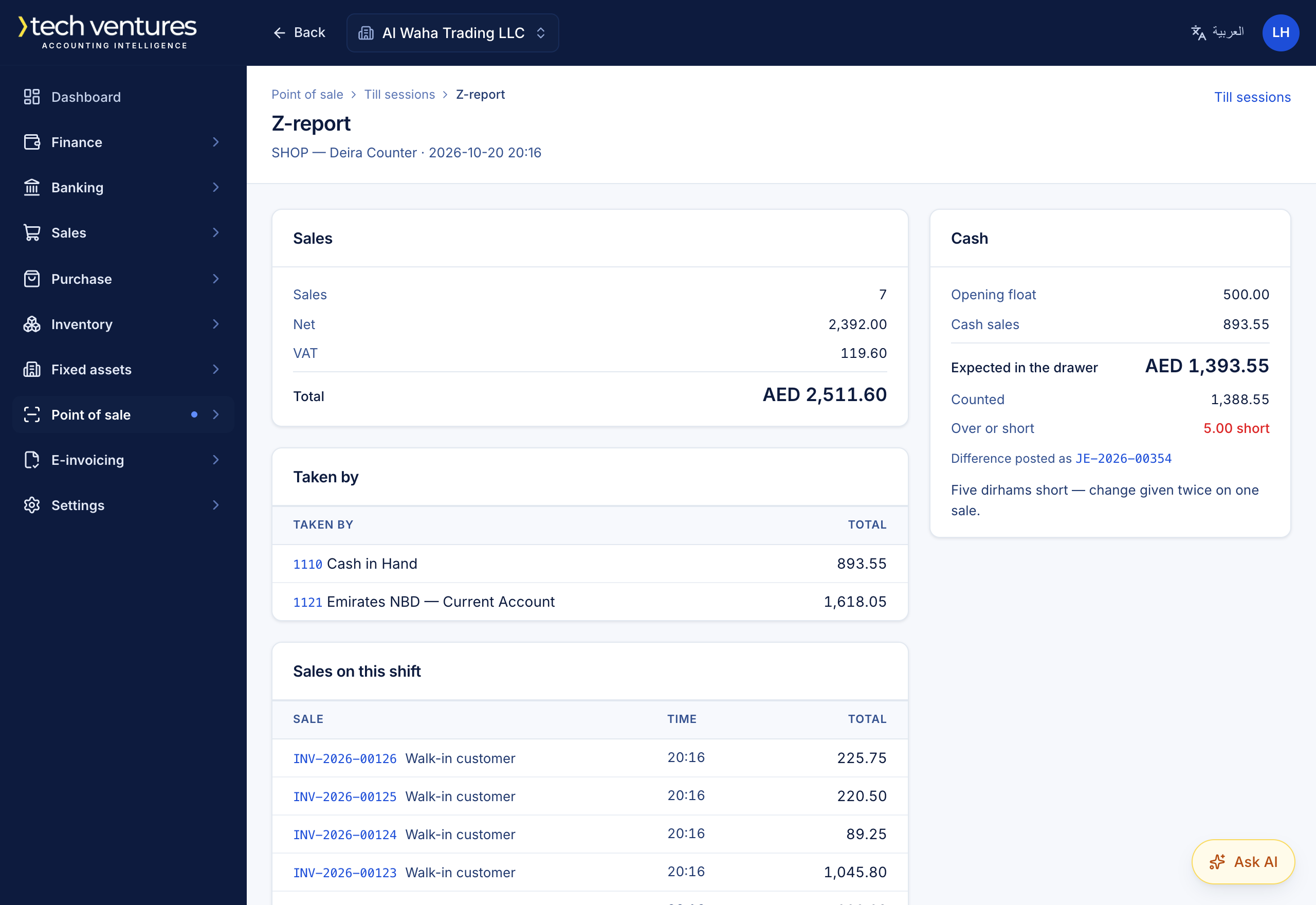
| Section | What it shows |
|---|---|
| Sales | Sales (the number of sales), Net, VAT and Total of the invoices rung up, and Credit notes — the total of returns taken on the shift. |
| Taken by | The takings per account they landed in — the cash drawer, the card takings account — less refunds paid from it. Cash is what stayed in the drawer, after change. |
| Sales on this shift | The eight most recent sales, with time and total, each linked to its receipt, so a customer who comes back for a slip can be given it. The full list is under Point of sale › Sales. |
| What sold | The items sold, with quantity and total including VAT, largest first (up to 20). |
| Cash | Opening float, Cash sales, Expected in the drawer, Counted and Over or short. |
| Difference posted as | The journal entry for a shortage or surplus, when there was one. |
Expected in the drawer is the opening float plus Cash sales — cash taken less cash refunds. Over or short is the count less the expected amount, shown as over, short, or square.
While the shift is open, the Z-report also carries Count the drawer, which is how a till is closed. See Open and close a till.
The dashboard
Point of sale › Dashboard shows:
- Sales today and Sales, last 30 days, each with the number of sales;
- Average basket (30 days);
- Shifts still open;
- Sales by day, last 14 days;
- Best sellers, last 30 days.
The till reports
Point of sale › All reports opens the report catalogue filtered to point of sale:
| Report | What it shows |
|---|---|
| Counter sales | Net, VAT, total, number of sales and average sale, by shop, till operator, shift, day, month, weekday, hour, customer, cost centre or project. |
| Counter takings | What was handed over, by the account it landed in — cash is the drawer, a card is the bank it settles into. Change given back is not takings. |
| Counter refunds | Returns taken at the till, by shop, operator, shift, day, month or customer. |
| Till shifts | Takings, number of sales and cash taken per shift, shop and operator. |
| Drawer counts | Opening float, cash taken, expected cash, counted cash and the difference, for closed shifts. A negative figure is a drawer that was short. |
Till sales are also ordinary sales invoices, so they appear in the sales reports and on the VAT 201 return with everything else.
Related articles
- Open and close a tillOpen a shift with the cash in the drawer, and at the end count the drawer and close it, posting any shortage or surplus to cash short or over.
- Ring up a saleBuild a basket at the till, apply discounts, take cash or card, and print the receipt — posting the sales invoice and its receipt together.
- Find and run a reportFind any of several hundred ready-made reports by searching or browsing by module, run it over a date range, export it, and star the ones you use.